How to remove a bad Google review — and what to do when you can't
Google only removes reviews that break its content rules. Honest negative reviews from real customers stay up — and anyone who promises otherwise is selling risk, not results. Here's how to report the reviews that qualify, and how to win anyway when yours doesn't.
The straight answer
You can get a Google review removed in exactly one case: it violates Google's review content policy — fake or spam reviews, harassment, hate speech, profanity, conflicts of interest, off-topic rants, or someone's private information. You report it, Google decides, and evaluation typically takes several days. An honest negative review from a real customer doesn't qualify, no matter how unfair it feels. There's no fee, no insider contact, and no shortcut that changes any of this.
What can come down
- A review from someone who was never your customer
- A review meant for a different business
- A competitor or ex-employee posing as a customer
- Threats, slurs, or someone's private information
- Obscene language or promotional spam
What won't come down
- An honest one-star from a real customer
- A complaint you think is exaggerated or one-sided
- A harsh-but-clean rant about price or slow service
- A star-only rating with no text (you can report it, but there's rarely evidence)
- Anything just because you disagree with it
What Google actually removes
When you report a review, Google's form asks you to pick a reason. These seven cover what Google enforces — they're the same seven categories ReviewNudger's review protection screens for. If the review doesn't fit one, skip ahead to the recovery plan.
Spam or fake
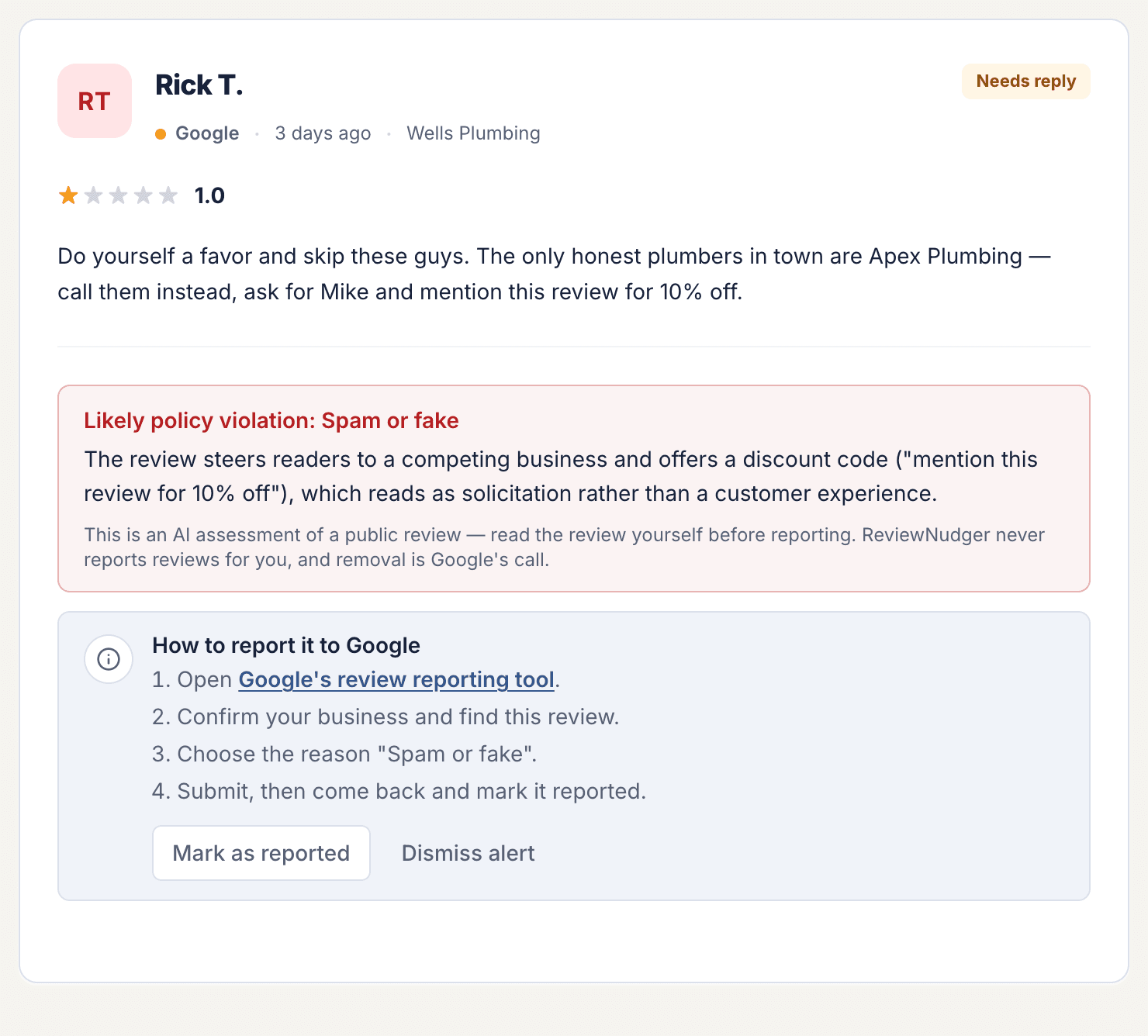
The reviewer was never a customer, posted the same text on many profiles, or is pushing links and promo codes for some other business.
Off topic
The text isn't about a customer experience at your business — politics, current events, a personal story that has nothing to do with your work, or a review clearly meant for a different business.
Conflict of interest
It was written by a current or former employee, a competitor, or someone who says they were paid or asked to leave it.
Profanity
Obscene, vulgar, or sexually explicit language — not just harsh words like "terrible" or "rip-off."
Bullying or harassment
It attacks, threatens, or intimidates a specific person — naming a technician and threatening them, for example — instead of describing the service.
Discrimination or hate speech
Slurs or attacks aimed at someone's race, religion, gender, or other protected traits.
Personal information
It publishes someone's phone number, home address, license plate, or similar private details. Your business's own public contact info doesn't count.
These map to Google's review content policy — worth a skim before you report, because reports that cite the right policy are the ones that stick.
How to report a Google review, step by step
There are two ways in, and both are free. Everything below matches Google's own documented process — no tricks, no insider access.
Fastest for owners: Google's review management tool
- 1Open Google's review management tool and sign in with the email you use to manage your Business Profile.
- 2Confirm your business, then choose "Report a new review for removal."
- 3Pick the review, choose the report reason that fits best, and submit.
- 4Check back in the same tool for your report's status — pending, reviewed with no violation found, or escalated.
From Google Maps or Search (anyone can do this)
- 1Find your business on Google Maps or in Search and open the review.
- 2Click or tap the three-dot menu next to the review.
- 3Choose "Report review," pick the reason, and submit.
This path works for anyone with a Google account — you don't have to own the profile.
What happens next
Google says review evaluation typically takes several days. Nothing about the process is instant, even for obvious violations.
If the answer is no, you get one appeal, filed through the same review management tool. Make it specific and factual: name the policy the review breaks and the evidence — "no customer by this name in our records" beats "this review is unfair."
Report only real violations. Google's own guidance is not to report a review just because you disagree with it. Reports spent on honest complaints remove nothing — and the plan below works either way.
When it stays up: the plan that actually works
Most bad reviews don't violate anything. These two moves are what actually protect your rating.
1. Reply once, publicly, like an owner worth hiring
Thank them, own the miss without excuses, say what you changed, and invite them to sort it out offline — about four sentences, written for the hundreds of future customers who will read the exchange, not for the reviewer. Never argue the facts line by line, and never offer money or a refund in exchange for taking the review down: paying for removal crosses into the review manipulation Google prohibits.
See word-for-word examples in our guide to responding to negative Google reviews.
2. Outweigh it with real reviews
Ratings are denominator math. At 4.8 stars with 15 reviews, one new one-star drops you to about 4.6. With 60 reviews, the same one-star leaves you at 4.7. And a bad review reads very differently buried under a stack of recent five-star stories than it does sitting on top as your latest. The businesses that shrug off bad reviews aren't lucky — they just never stop collecting real ones.
Check where you stand with the free review scanner — it shows how many new five-star reviews it takes to move your rating.
Where ReviewNudger fits in
ReviewNudger doesn't make reviews disappear — nobody outside Google can. It makes both moves above automatic, so the next bad review finds you prepared.
Review protection flags what's reportable
ReviewNudger syncs your Google reviews and screens each new one against the same seven report reasons above. When a review looks like a violation, you get an alert naming the matching report category with a plain-English explanation of the evidence — so filing the report in Google's tool takes minutes, not a research project. Then you can track it as reported, removed, or dismissed.
Automatic requests outweigh the rest
After a customer pays, ReviewNudger sends one polite review request by text or email and follows up on your schedule. That steady stream of real reviews is what makes a single bad one stop mattering — and it doesn't slow down when you get busy.
What ReviewNudger never does
- It never files reports for you. Reports go to Google through Google's own tool, from you — ReviewNudger hands you the category and the reasoning.
- It never promises removal. Only Google decides, and honest software says so up front.
- It never hides, filters, or screens out negative reviews. Every customer gets the same ask — quietly suppressing bad feedback violates FTC rules on customer reviews, and it's not how trust gets built anyway.
Frequently asked questions
Can I pay a company to remove bad Google reviews?
No legitimate company can remove a Google review. Only Google decides removals, its report form is free, and the process is the same for everyone. Paid "removal" pitches either file the same free report you can file yourself in minutes, or use tactics that violate Google's policies and put your whole profile at risk.
How long does Google take to remove a review?
Google says review evaluation typically takes several days. An appeal adds more time. Even clear-cut violations are not removed instantly, so post your public reply while you wait instead of holding off.
Can I turn off Google reviews for my business?
No. Reviews are built into how Google Maps and Search present businesses, and Google doesn't offer an off switch. The workable plan is the one in this guide: report actual violations, reply well to the rest, and keep real reviews coming so no single one defines you.
What if Google rejects my report?
You get one appeal, filed through the same review management tool. Make it specific: name the exact policy the review violates and the facts that show it — vague "this is unfair" appeals fail. If the appeal fails too, the review almost certainly doesn't qualify, so put your energy into the public reply and into new reviews instead.
Can the reviewer change or delete their own review?
Yes, anytime. When you genuinely fix the problem, some customers update or remove their review on their own. It has to stay their call, though: offering money, discounts, or perks to change a review violates Google's policies and can cost you far more than the review did.
Does ReviewNudger remove bad Google reviews?
No — and we say so on purpose, because nobody outside Google can. ReviewNudger flags reviews that likely violate Google's policy, hands you the matching report category and a plain-English explanation so reporting in Google's tool takes minutes, and automates the review requests that outweigh everything else.

Make review requests part of your routine.
Set up in about 10 minutes. Requests go out after each paid job, follow-ups run on their own, and every review lands in one inbox.
$0 today · card required · no charge until your 14-day trial ends · $29 a month per location after that