Ask for a Google review while the finished job is still fresh
Connect a supported payment app to ask customers for a Google review after a paid job. Choose text, email, or both, and set when the request and follow-ups go out. Requests need usable customer contact details and follow your sending settings, so your team has fewer reminders to manage.
14-day free trial · card required · then $29/mo per location · cancel anytime
Trial: up to 50 SMS attempts from your approved toll-free number or, when the sending conditions are met and one is available, a ReviewNudger number during carrier review. See pricing for sending limits.
Start with a payment from a supported app
Connect a supported payment app, use Zapier, or set up a direct connection from your own system. The payment is the signal. ReviewNudger decides whether and when to ask from there.
Choose the delay
Send after the delay you set instead of interrupting the customer at checkout. Quiet hours hold a message that would land late at night until the next allowed time in your time zone.
Use text, email, or both
The request uses the channels you turn on. It needs a usable phone number or email address, and trial texting needs a toll-free number in carrier review or approved, plus remaining trial messages. The dashboard explains when a channel cannot send.
Pause without disconnecting
One pause switch stops new requests and anything waiting to send. Billing, your Google reviews, and the dashboard keep working while you are paused.
Every payment is checked before it becomes a request
Payment apps often report the same payment more than once, and connections hiccup. ReviewNudger checks whether a payment can start a request and keeps a record of every message it sends. Duplicate protection keeps a repeat or a retry from creating an extra request or message.
Duplicate protection
When the same payment arrives again, minutes or days later, it is matched to the request already made for it instead of being treated as new. Nobody is asked twice for one job.
Cooldown rules
A cooldown you set stops the same customer from being asked again too soon, even when another payment comes in.
Unsubscribes and do-not-contact
A text or email unsubscribe, a do-not-contact mark, missing contact details, or automation switched off each stops the request or that channel, and the dashboard shows why.
Everyone gets the same ask
Whether a customer is asked depends on the payment and your settings, never on a guess about whether they will leave a good review.
One neutral standard
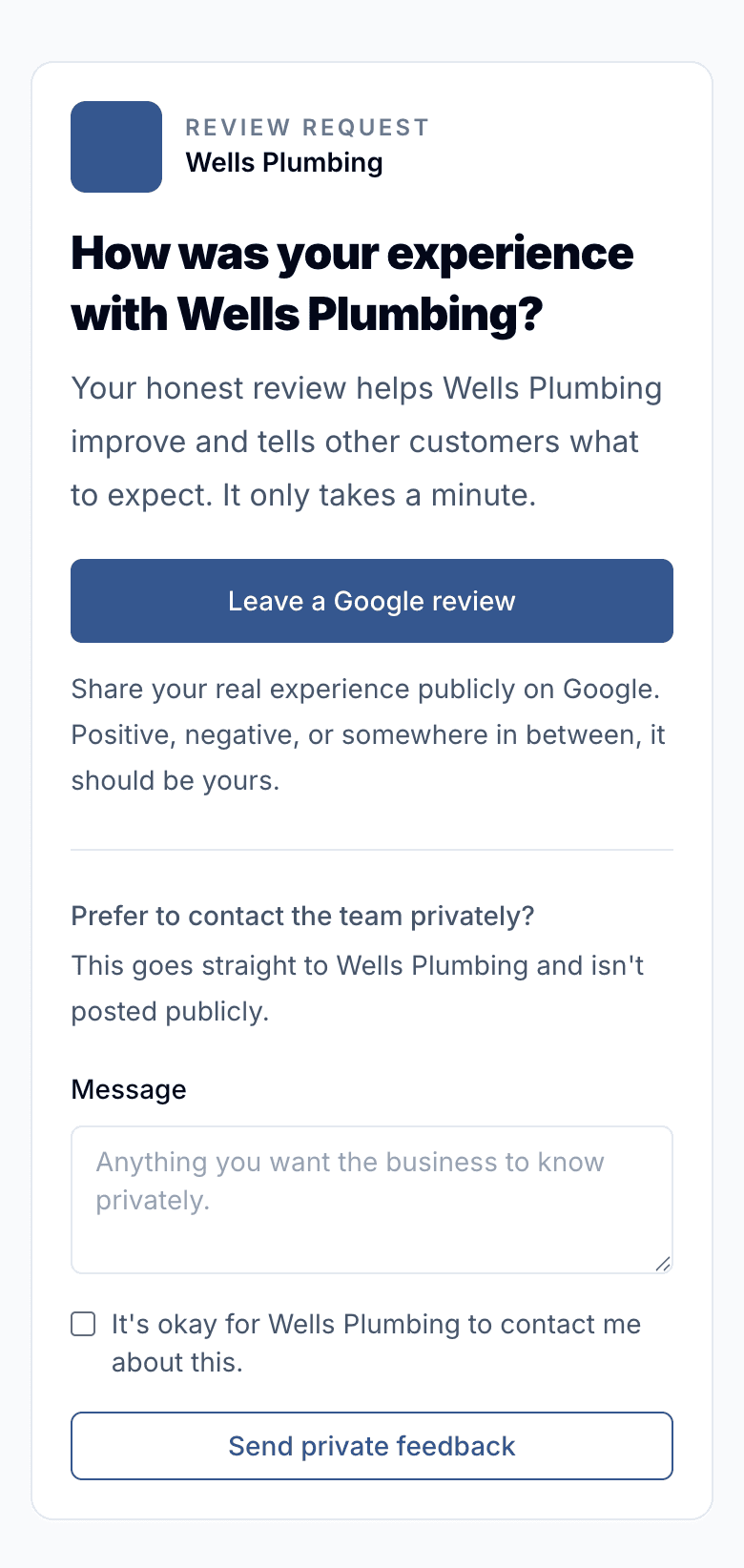
Review requests ask for honest feedback. ReviewNudger does not hide the Google review link from unhappy customers.
Private feedback stays optional
You can offer a private feedback form, but a customer who says they were unhappy still sees the Google review link. It is never hidden from anyone.
Visible outcomes
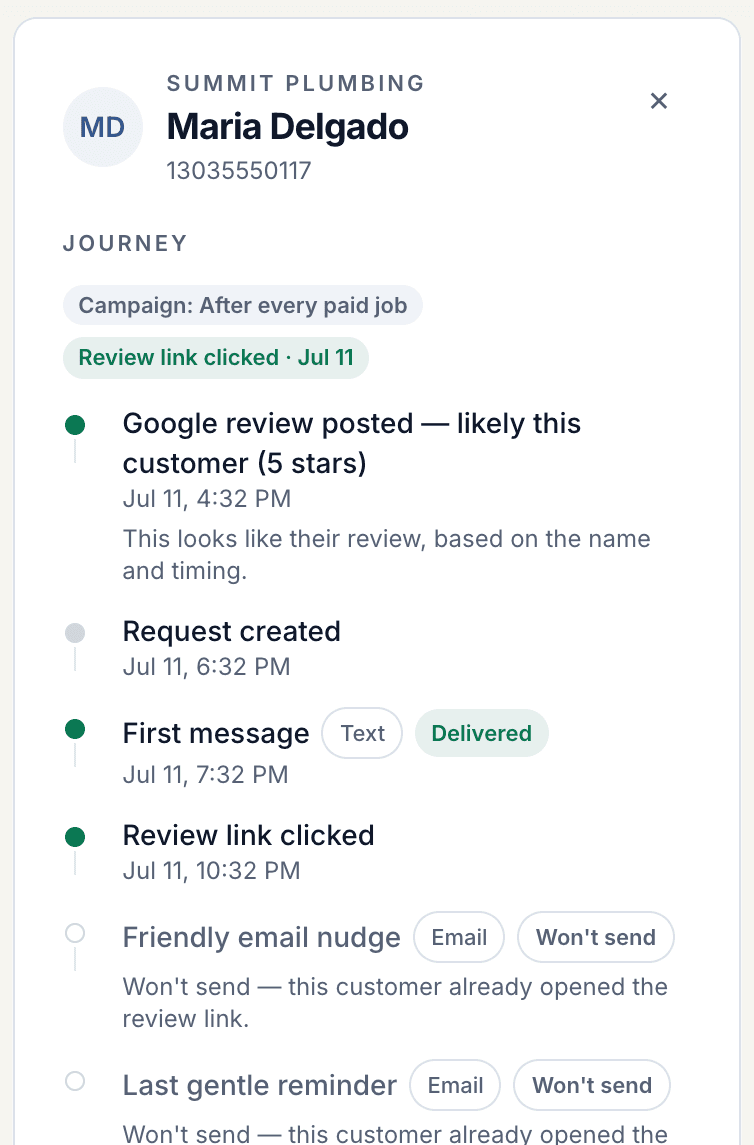
Every request shows whether it was sent, skipped, held back, or failed, and why, so you never have to guess what happened.
From paid job to review request
The message to your customer is the last step in a short chain of checks, not something fired the instant a payment lands.
- 1Your connected app reports a paid job, or you start a request by hand from the dashboard. Both go through the same checks.
- 2ReviewNudger matches the payment to the customer and checks that automation is on, the customer can be reached, they have not unsubscribed, and they were not asked recently.
- 3One request is scheduled for the delay you chose, following your default follow-up sequence.
- 4Each text or email is recorded before it is handed to the texting or email service, so a retry can never send the same message twice.
What this feature does not promise
ReviewNudger is deliberately clear about provider boundaries, consent, and outcomes.
- Automatic requests need a supported payment app, a Zapier connection, or a direct connection from your own system.
- Trial: up to 50 SMS attempts from your approved toll-free number or, when the sending conditions are met and one is available, a ReviewNudger number during carrier review. See pricing for sending limits.
- Email requests need your business postal address on file, because email law requires it in every marketing email.
- No software can guarantee a customer will leave a review or that Google will publish it.
Frequently asked questions
Can I send review requests manually too?
Yes. Sends from the dashboard and from your staff’s quick send link go through the same checks as automatic ones: automation on, no unsubscribe, a way to reach the customer, and the cooldown.
What happens when the same payment event is delivered twice?
Nothing extra goes out. The repeat is matched to the payment already on record, so it cannot create a second request or a second message. If the first attempt was interrupted partway, the repeat lets it finish.
Does ReviewNudger send only to happy customers?
No. Who gets asked depends on the payment and your settings, not on a guess about how happy they are. The optional “how did we do?” question never hides the Google review link from a customer who answers unhappy.
Can I control when messages arrive?
Yes. Set the first delay and optional quiet hours. Each follow-up waits its own number of days after the message before it.
Keep exploring
Follow the feature into the relevant workflow, free tool, or practical guide.

Make review requests part of your routine.
Set up in about 10 minutes. Requests go out after each paid job, follow-ups run on their own, and every review lands in one inbox.
$0 today · card required · no charge until your 14-day trial ends · $29 a month per location after that