Follow-ups that run themselves, in plain sight
A campaign is the order your messages go out in: a text first, then email follow-ups a few days apart. Each step has a channel, a wait, an on/off switch, and its own wording. There are no branches, audiences, or rules to debug. Every customer gets the same polite rhythm, and it stops the moment they respond.
14-day free trial · card required · then $29/mo per location · cancel anytime
Trial: up to 50 SMS attempts from your approved toll-free number or, when the sending conditions are met and one is available, a ReviewNudger number during carrier review. See pricing for sending limits.
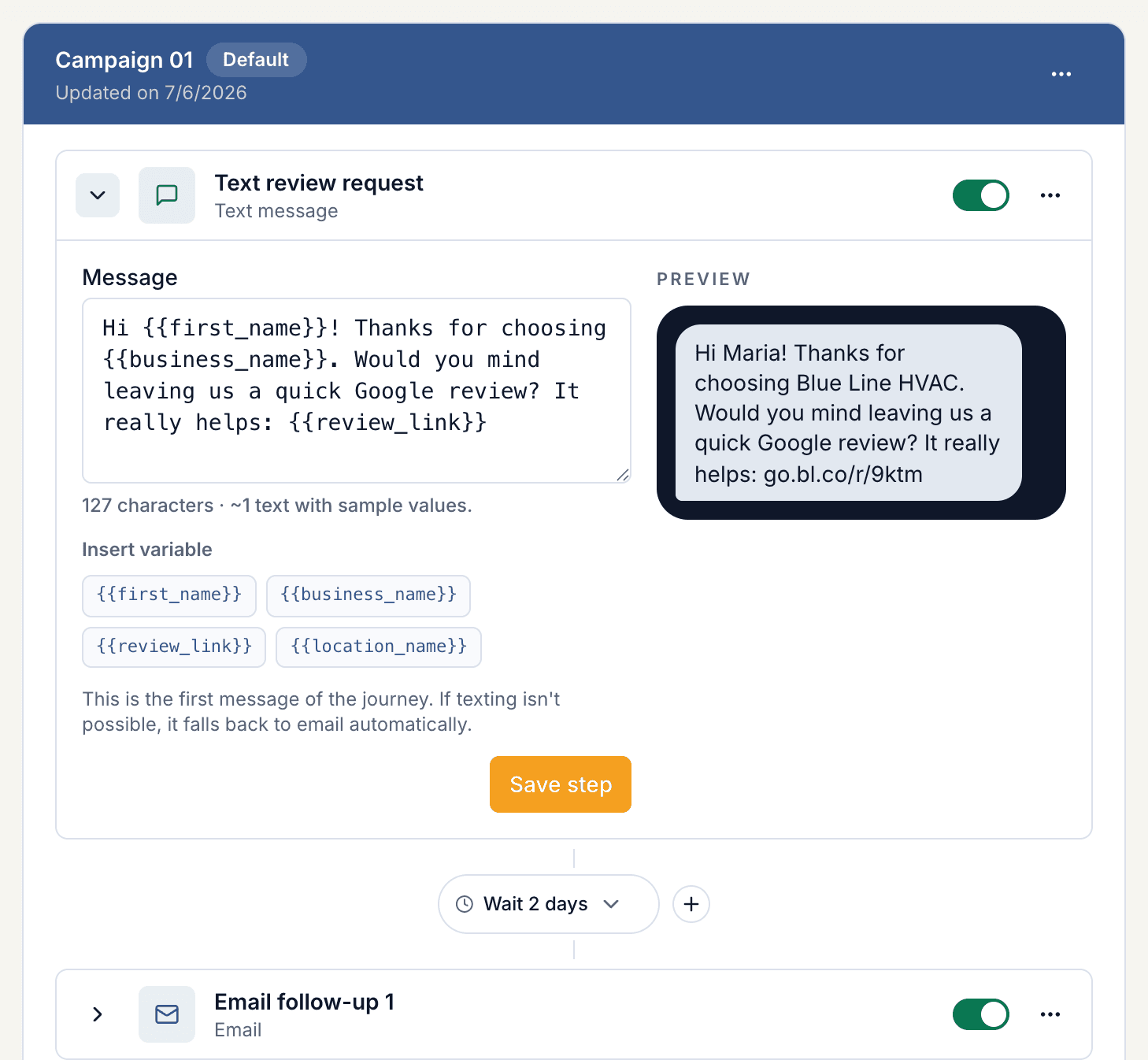
A short list of steps, not a campaign builder
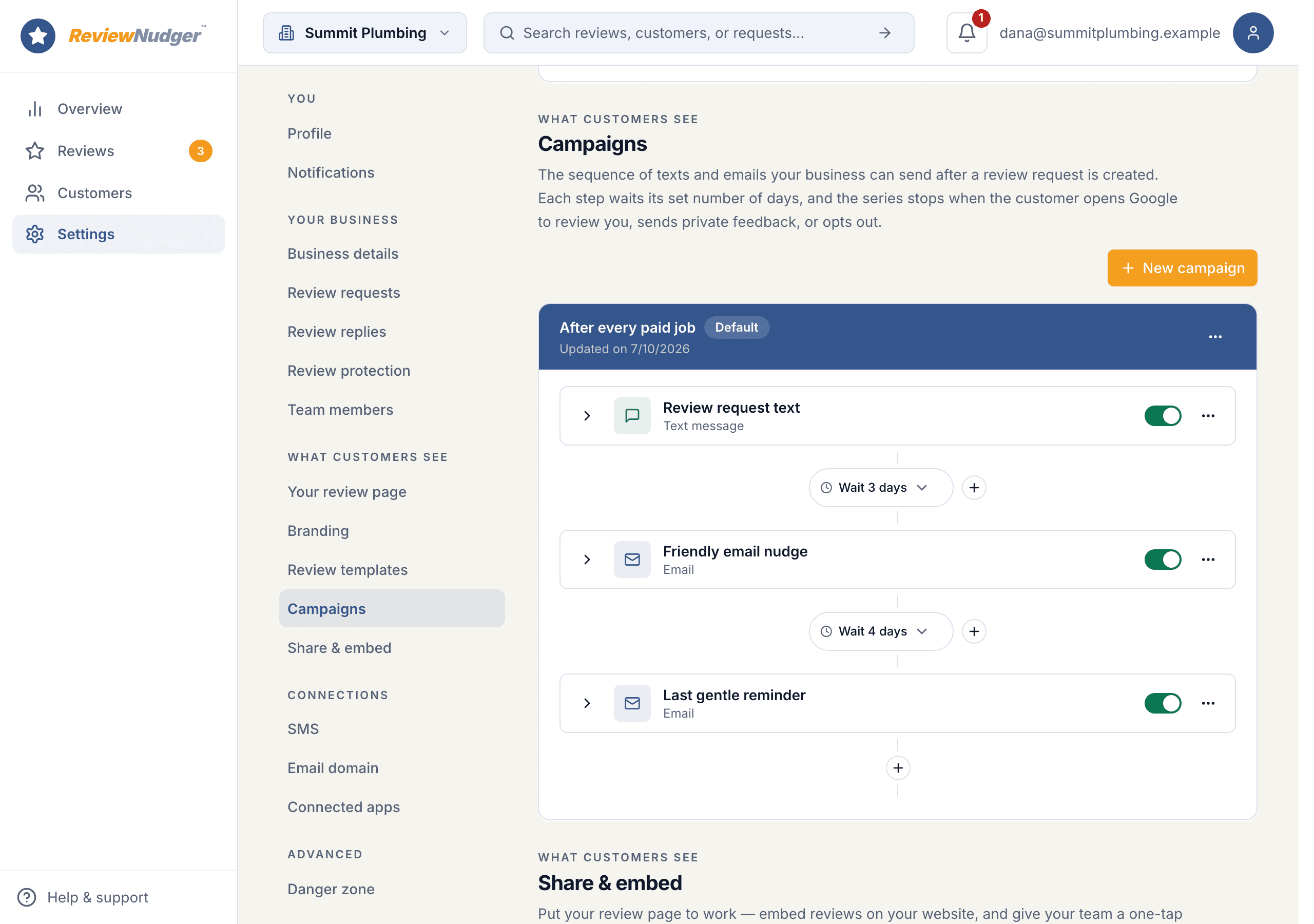
The first step is the request itself. Each later step waits a set number of days after the message before it, so you can read the whole plan top to bottom and know exactly when each message lands.
Text or email, your order
Pick text or email for each step and put them in whatever order you like. New accounts start with a text, then two email follow-ups: one 2 days later, one 5 days after that.
Wait days between steps
Set how many days to wait after the previous message. Texts respect your quiet hours and move to the next allowed time; email follow-ups send as scheduled.
More than one campaign
Keep several named campaigns and mark one as the default. New requests use the default unless you pick another when you send.
Each step says what that moment needs
Every step carries its own wording. Leave a field blank and it falls back to your account-wide message, or to ReviewNudger’s neutral default.
Text message
Write the text for each text step. ReviewNudger adds the customer’s personal review link when it sends.
Email subject, body, and button
Email steps have their own subject line, body, and button label. Your business address goes in the footer automatically, as email law requires.
Edits apply going forward
Change a step and every customer who has not reached it yet gets the new version. Messages already sent stay as they were.
A follow-up never outranks the customer
Before each message goes out, ReviewNudger checks whether the customer has already responded and whether that channel can still reach them.
Any response ends the sequence
Tapping the Google link, sending private feedback, texting back, or saying they were unhappy on a pre-screen all stop the remaining follow-ups that instant.
Opt-outs are honored immediately
A customer who replies STOP gets no more texts, one who unsubscribes gets no more email, and one you mark do-not-contact gets nothing further at all.
You can stop it too
Stop the remaining follow-ups for any one customer from their request page. What was already sent stays in the record.
How a campaign runs for one customer
Each step waits for the one before it, and the timeline on the customer’s request page shows what went out, what is next, and why anything stopped.
- 1Set up your campaign: put the steps in order, choose text or email for each, and set the wording and the wait days.
- 2A new request uses your default campaign. The first message goes out after the delay you set for requests.
- 3Each later step waits its number of days after the previous message, then sends, unless the customer has responded.
- 4Right before every send, ReviewNudger checks for a response, an opt-out, a pause on your account, quiet hours, and whether texting and email are set up.
What this feature does not promise
ReviewNudger is deliberately clear about provider boundaries, consent, and outcomes.
- Campaigns are ordered text and email steps only. There are no branches, audience segments, conditions, or trigger rules.
- Editing a campaign changes the steps a customer has not reached yet. It never rewrites a message already sent.
- If a step cannot reach the customer (no email on file, say), it is marked skipped on the timeline and the next step still runs. Nothing is sent for a skipped step.
- Texting and email each have to be set up before a step on that channel can send, no matter how the campaign is configured.
Frequently asked questions
How many campaigns can I create?
As many as you like, with one marked as the default. New requests use the default unless you choose another campaign when you send.
When does the wait for a follow-up begin?
The wait counts from the previous step, whether that message went out or was marked skipped. So a 2-day wait after a text sent Monday means Wednesday.
What if a customer has no email address for an email step?
That step is marked skipped on the customer’s timeline and the sequence moves on to the next step that can reach them. Nothing is sent for the skipped step.
What stops the follow-ups?
Any response from the customer: tapping the Google link, sending private feedback, texting back, or answering a pre-screen that they were unhappy. Opting out stops that channel. You can also stop the rest yourself from the customer’s request page.
Can I stop follow-ups for one customer?
Yes. Open that customer’s request and choose Stop follow-ups. Messages already sent stay in the record; nothing more goes out.
Keep exploring
Follow the feature into the relevant workflow, free tool, or practical guide.

Make review requests part of your routine.
Set up in about 10 minutes. Requests go out after each paid job, follow-ups run on their own, and every review lands in one inbox.
$0 today · card required · no charge until your 14-day trial ends · $29 a month per location after that