Catch likely policy violations, then report them the way Google requires: yourself
Reports about Google reviews reach Google only through its own signed-in tools — there is no API for reporting, so no software can file one for you, and review protection never pretends to. ReviewNudger screens each newly synced review, and a flag must survive a second, deliberately skeptical check against Google’s definition before you ever see it. You read the explanation, report in Google’s tool if you agree, and Google alone decides removal.
14-day free trial · card required · then $29/mo per location · cancel anytime
Trial: up to 50 SMS attempts from your approved toll-free number or, when the sending conditions are met and one is available, a ReviewNudger number during carrier review. See pricing for sending limits.
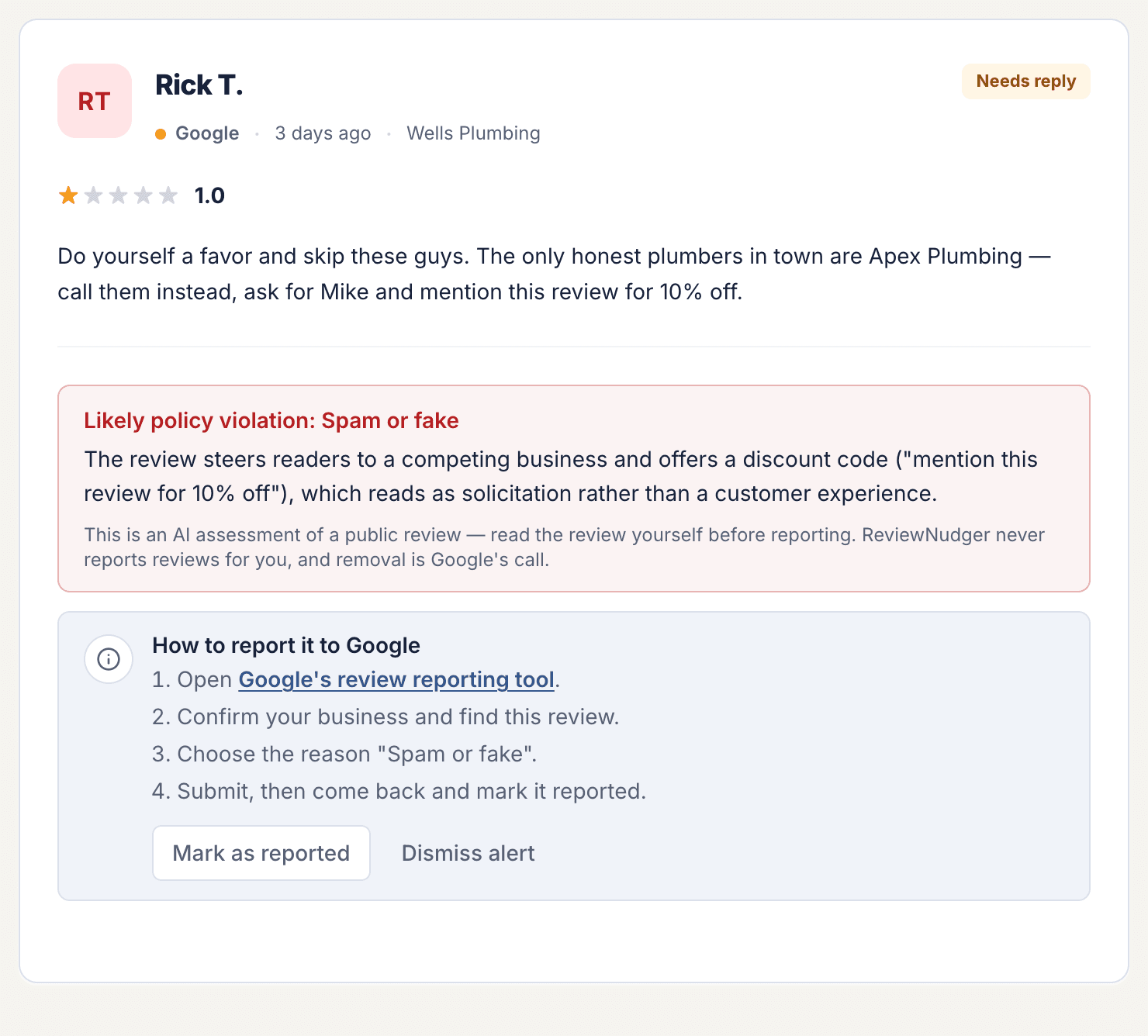
No software can file a Google review report, so ours never pretends to
Google’s Business Profile API lets software read reviews and post owner replies. It has no endpoint for reporting a review — a report exists only inside Google’s own signed-in tools. That one fact decides what an honest review tool can automate.
Auto-reporting would mean bots
A service that promises to file reports or get reviews taken down for you would have to script Google’s own screens under your business identity — the kind of automated access Google’s terms do not allow, with your profile attached to it, not theirs.
ReviewNudger stops at the flag
The scan, the category, and the explanation live in your dashboard. Nothing goes to Google until you open its reporting tool and decide the flag is right, exactly as if the software were not involved.
Official APIs only
Review sync and owner replies run through Google’s supported Business Profile API on your own connection. Where Google offers no API — reporting — ReviewNudger deliberately does nothing in your name.
Screened against Google’s report reasons, then checked a second time
A harsh review is not automatically a policy violation, so a flag has to earn its way to you: the screen proposes at most one of the seven reasons on Google’s report form, and a second, deliberately skeptical check must confirm that reason against Google’s definition — otherwise the review is marked clear.
Spam or fake content
Possible fabricated experiences, wrong-business reviews, promotional spam, or repeated content can be flagged for an operator to assess.
Conflicts and off-topic content
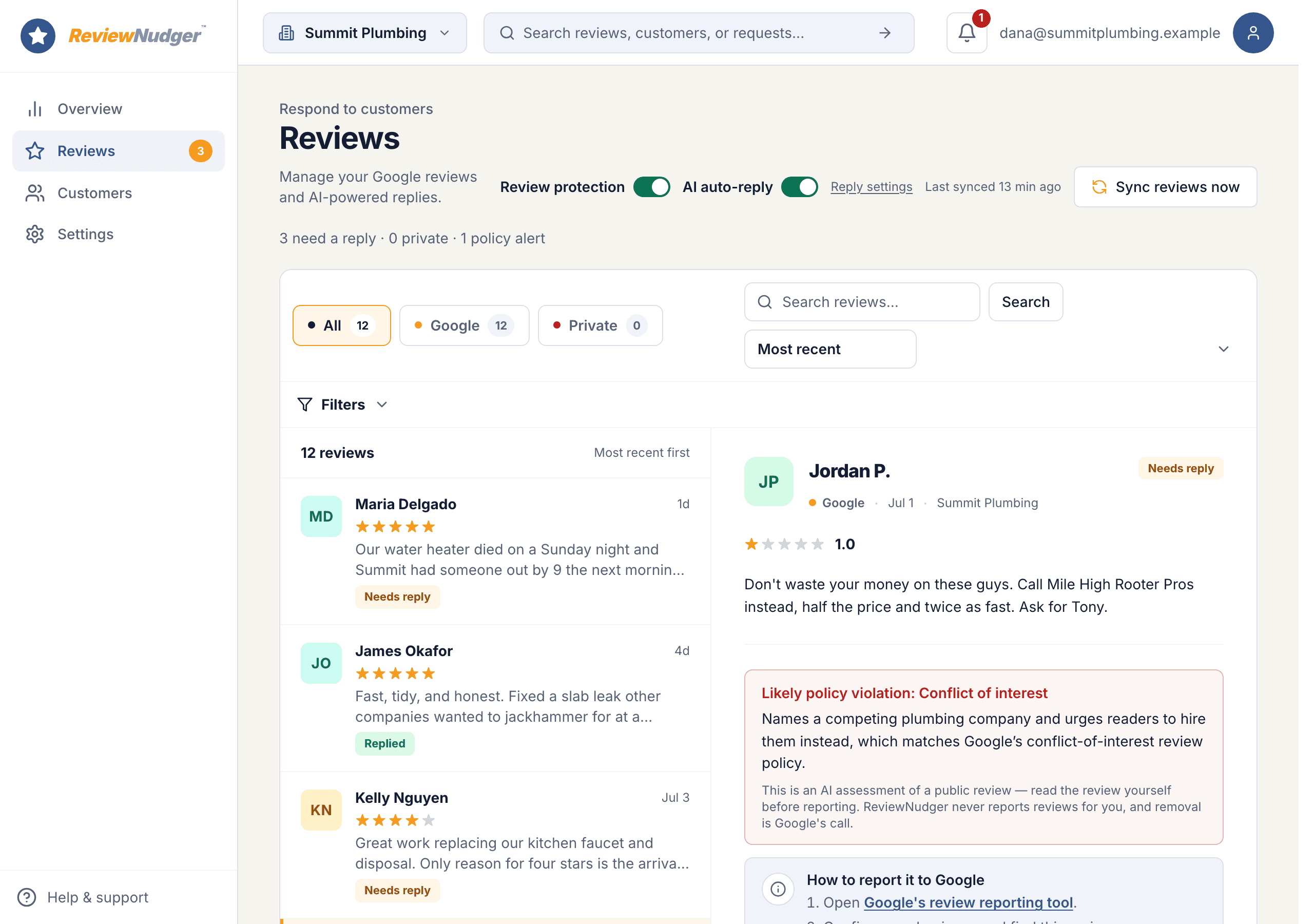
The screen can identify likely competitor or employee conflicts and text that is unrelated to a real experience with the business.
Harmful or private content
Profanity, harassment, hate speech, discrimination, and personal information map to the corresponding Google reporting categories.
An alert explains the next step without pretending it is a removal
Screening, reporting, and Google’s decision stay three separate stages, tracked on the review itself so the dashboard never overstates what happened — and the review stays open for a calm public reply while Google takes its time.
Read the explanation
The alert shows the likely category and a concise reason grounded in the public review text, giving the operator a starting point for verification.
Report through Google
The operator opens Google’s own reporting workflow, chooses the reason, and submits the report under the connected business profile.
Record the outcome
Mark the alert reported, removed by Google, or dismissed so the review inbox reflects the operator’s real-world follow-up.
From synced review to an operator-owned report
The feature stays useful by being explicit about which part ReviewNudger owns and which parts belong to the business and Google.
- 1A newly synced Google review is claimed once for policy screening unless the business has disabled future scans.
- 2The screen proposes at most one of the seven Google report reasons, and a second skeptical check must confirm it against Google’s definition of that reason — otherwise the review is marked clear; failures stay visible and are not silently retried, and the operator can ask for a check on any review the automatic pass has not finished.
- 3A flagged review appears as a policy alert, and the operator checks the public text against Google’s current content policy.
- 4The operator reports through Google and records reported, removed, or dismissed status in ReviewNudger for team visibility.
What this feature does not promise
ReviewNudger is deliberately clear about provider boundaries, consent, and outcomes.
- ReviewNudger does not report reviews to Google, contact reviewers, or remove reviews. The operator uses Google’s reporting tool and Google makes the final decision.
- The screen is an AI-generated advisory assessment, not legal advice or a guarantee that Google will agree with the category.
- Each review is screened at most once. If the reviewer later edits the text, the original verdict remains as an audit of the earlier scan.
- Disabling review protection stops new scans but does not erase prior verdicts or operator lifecycle history.
- Google generally leaves genuine customer opinions online even when they are one-sided or costly. Review protection exists for likely rule violations, not reputation erasure, and it never decides which customers may leave a review.
Frequently asked questions
Can ReviewNudger remove a bad Google review?
No. ReviewNudger can flag a review that may violate Google’s policy and help the operator reach the matching reporting workflow. Only Google evaluates the report and decides whether to remove the review.
Does every one-star review get flagged?
No. Star rating alone is not a policy violation. A real customer is allowed to leave a critical review. The screen looks for Google-aligned content issues such as spam, conflicts, harassment, or personal information.
What happens if the policy screen is wrong?
Treat every flag as advisory. The operator reads the review, checks Google’s policy, and can dismiss the alert instead of reporting it. Google still makes the final decision on any submitted report.
Is review protection a review gate?
No. It analyzes reviews only after they are public on Google. It never decides which customers may leave a review, and ReviewNudger’s negative or below-threshold customer paths always keep the public-review link available.
Can any service file the Google report automatically?
No. Google offers no API for reporting reviews, so a report can only be filed by a person signed in to Google’s own tools. A service claiming to submit reports for you would have to automate those screens under your business identity — access Google’s terms do not allow. ReviewNudger deliberately stops at the flag.
Does using review protection put my Google Business Profile at risk?
No. The screening happens on ReviewNudger’s side, over review text that is already public, and sends nothing to Google. If you choose to report, you do it yourself in Google’s tool — from Google’s side it looks exactly like an owner reading their reviews and filing a report by hand, because that is what it is.
Keep exploring
Follow the feature into the relevant workflow, free tool, or practical guide.

Make review requests part of your routine.
Set up in about 10 minutes. Requests go out after each paid job, follow-ups run on their own, and every review lands in one inbox.
$0 today · card required · no charge until your 14-day trial ends · $29 a month per location after that