Send Google review requests after Housecall Pro invoices are paid
Housecall Pro sends verified payment facts directly to ReviewNudger. Each matching event can create one neutral Google review request by SMS or email, with the trigger, contact resolution, and every suppression visible.
14-day free trial · card required · then $29/mo per location · cancel anytime
Trial: up to 50 SMS attempts from your approved toll-free number or, when the sending conditions are met and one is available, a ReviewNudger number during carrier review. See pricing for sending limits.
 Direct API connection to Housecall Pro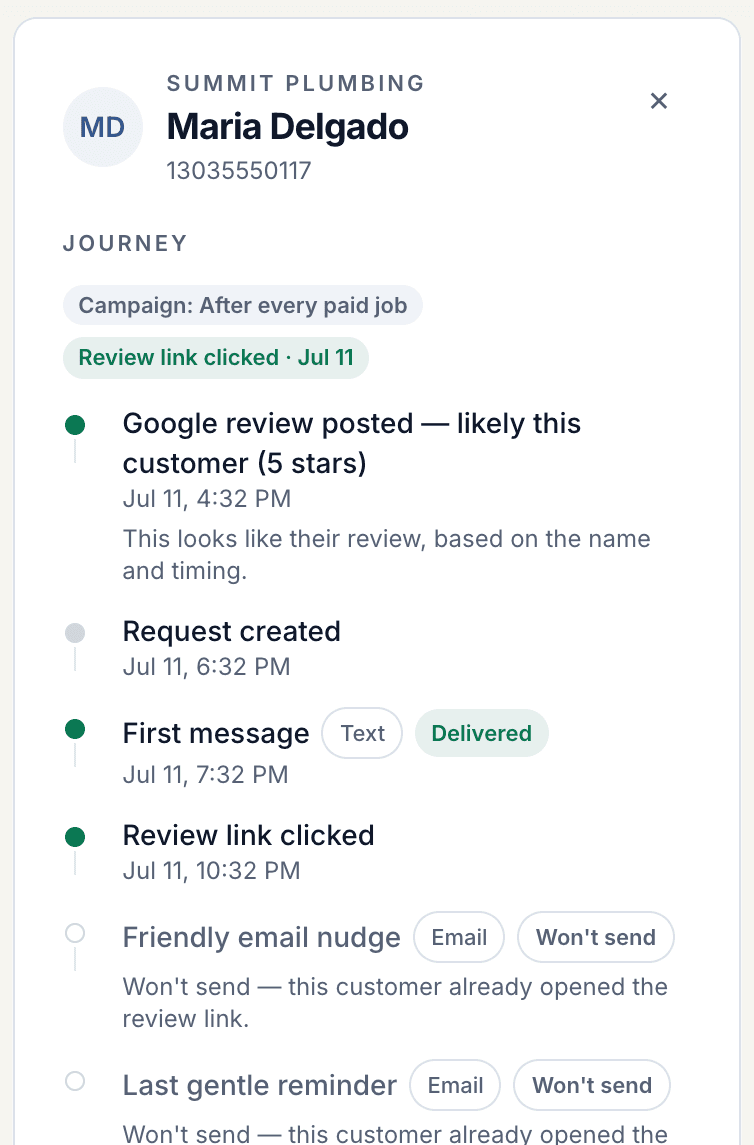
What Housecall Pro sends — and what ReviewNudger requires
The integration starts from a specific provider event, then resolves only the payment and customer facts listed here.
Accepted provider event
invoice.paid only
ReviewNudger accepts Housecall Pro's invoice.paid webhook. job.paid and invoice.payment.succeeded are intentionally ignored so overlapping event families do not start separate journeys.
Invoice amount and job ID
The invoice.paid payload must include the invoice amount and job ID. ReviewNudger uses that job ID to fetch the current Housecall Pro job.
A reachable job customer
The fetched job must have a customer with a usable email address or mobile, home, or work phone number.
MAX or XL plan and verified webhook
Housecall Pro API access requires the MAX or XL plan. The connection needs an API key, webhook signing secret, and enabled invoice.paid webhook.
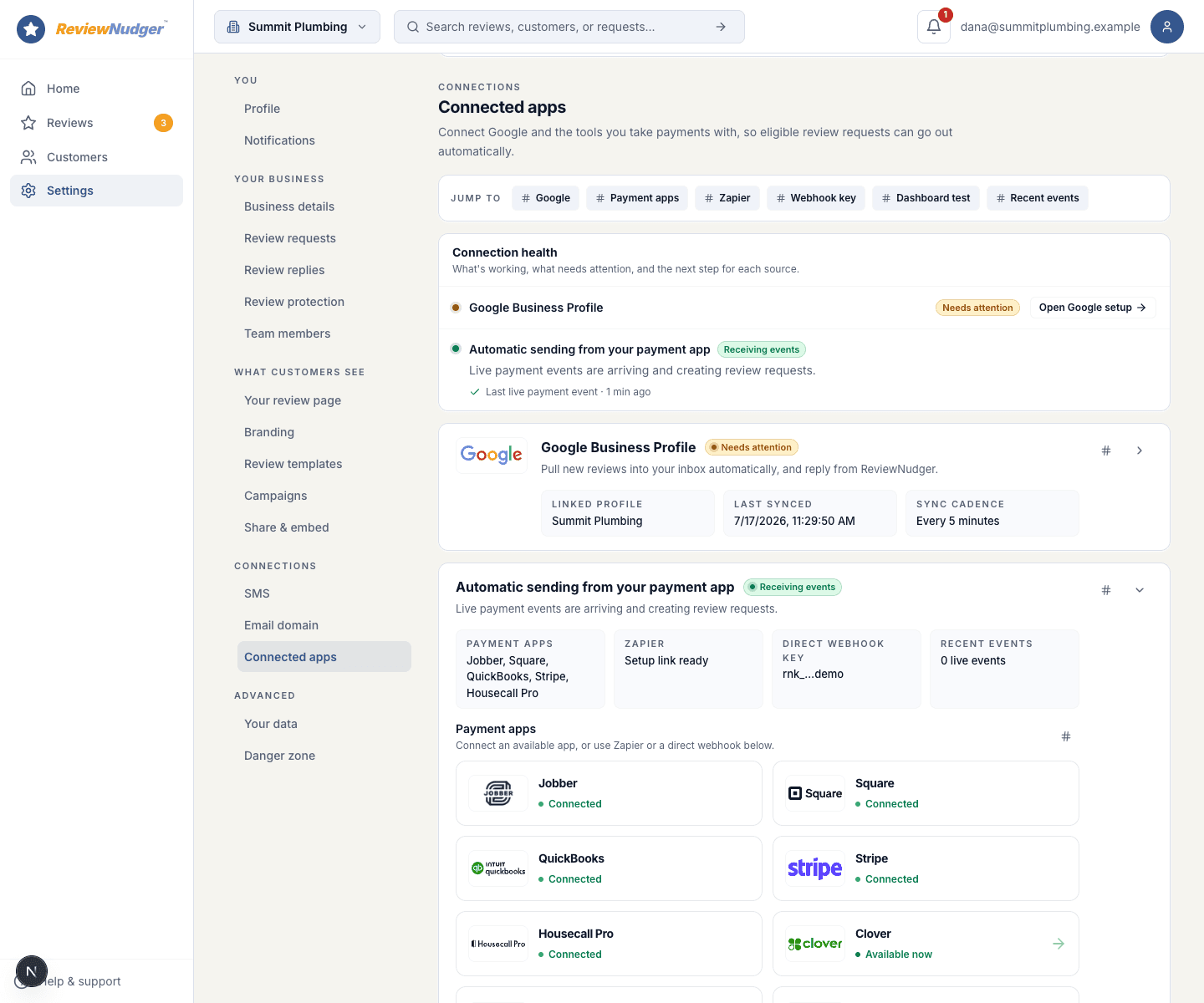
See the connection and its latest event
The connected-apps view shows whether Housecall Pro is connected, whether ReviewNudger has received an event, and whether that event was processed or needs attention.
Illustrative product walkthrough using fictional Summit Plumbing data — not a customer case study.
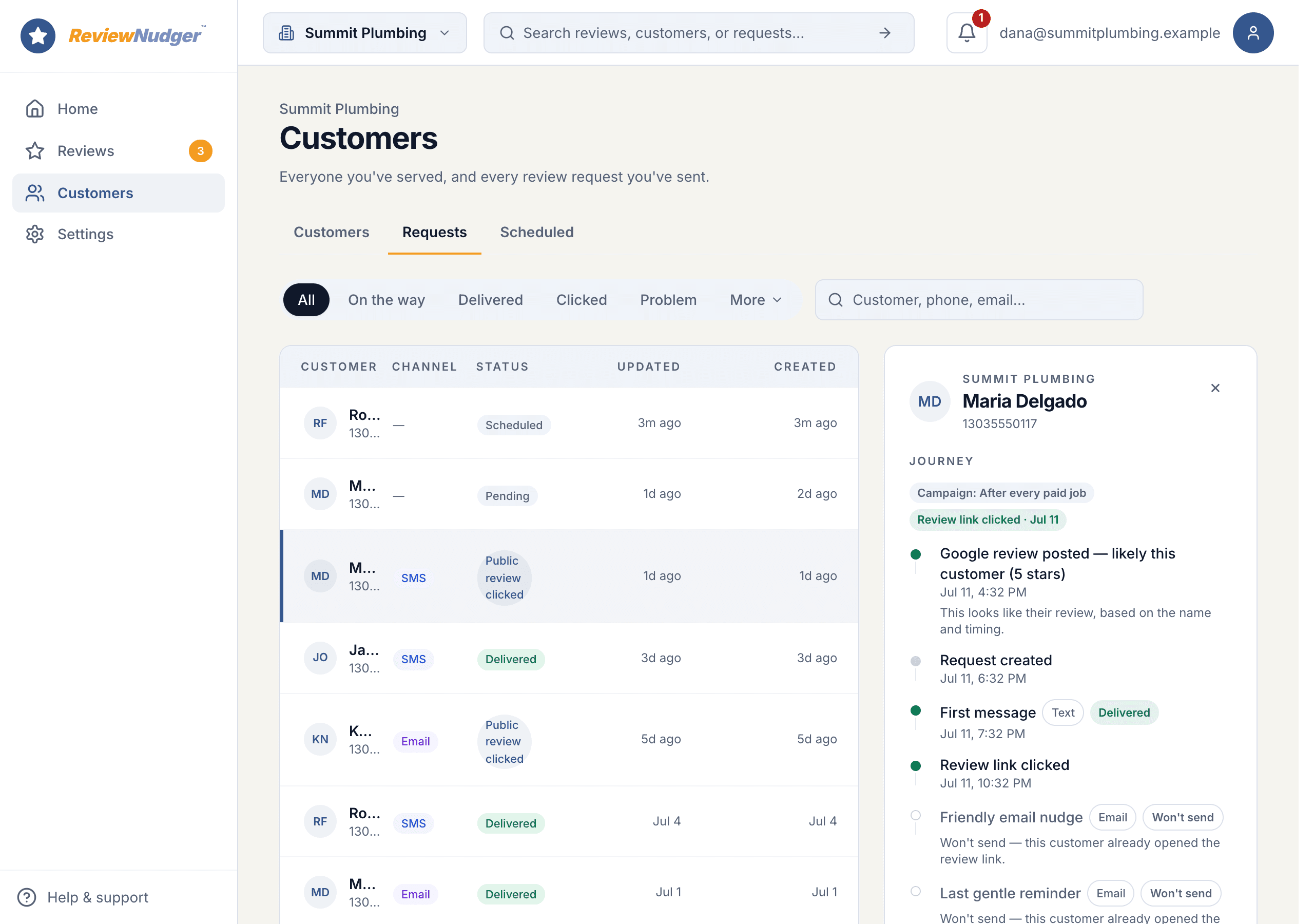
From paid event to request, every step stays visible
The request journey records the trigger, initial delivery, follow-ups, stops, and outcomes in one timeline.
- 1Connect Housecall Pro to ReviewNudger from a MAX or XL plan account using both the API key and webhook signing secret, then enable the invoice.paid webhook at the endpoint shown during setup.
- 2When an invoice is paid in Housecall Pro, ReviewNudger receives the event, pulls the customer's contact details from the job, and applies your sending rules. It can then send one neutral Google review request by SMS or email.
- 3Every send is tracked with delivery status, opt-outs, and review click-through, all from one dashboard.
Illustrative product walkthrough using fictional Summit Plumbing data — not a customer case study.
What happens when the clean path is not available
Skipped and failed events are recorded with a reason. Nothing silently guesses a customer or sends around an opt-out.
Retries collapse onto one journey
Provider retries and repeated updates reuse the same provider payment identity. They cannot create a second ReviewNudger review-request journey.
Missing facts fail visibly
ReviewNudger requires the provider's amount and customer contact facts. If either is missing, the incoming event records the failure and no customer is guessed.
Sending rules can suppress the request
Disabled automation, an active cooldown, do-not-contact state, or an opt-out on the usable channel suppresses the request with a visible reason.
Refunds do not create or rewind journeys
Refund and reversal events do not create another request. They also do not automatically cancel a journey that already exists; an operator can cancel a queued request or stop later follow-ups.
The job owns customer resolution
ReviewNudger fetches the job named by the invoice and uses that job customer. Missing invoice amount, job ID, customer, or contact facts fail visibly.
Webhook signatures are required
ReviewNudger verifies the signing secret before accepting an event. An API key alone can fetch jobs, but it is not a complete or safe webhook setup.
Email can carry the first request while SMS waits
A newly registered SMS number must be approved before it can send customer messages. ReviewNudger never sends from a number that is still pending.
Use email when it is allowed and usable
If the customer has email, the location has email enabled, and the required business address is configured, email carries the initial request while SMS is under carrier review.
Otherwise, keep the event recoverable
If no usable email route exists, the event is visibly suppressed as sms_not_ready. After SMS approval, an operator can recover it from recent events instead of asking the provider to send it again.
Connect Housecall Pro and prove the trigger end to end
Have these provider and ReviewNudger details ready before you connect.
Before you start
- A Housecall Pro MAX or XL plan and administrator access.
- A Housecall Pro API key and webhook signing secret.
- An enabled invoice.paid webhook pointed at the endpoint shown in ReviewNudger.
- Job customers with email or mobile, home, or work phone saved.
- 1Start a ReviewNudger trial and finish the short signup.
- 2Confirm that your Housecall Pro account is on the MAX or XL plan, then create an API key with administrator access.
- 3In Housecall Pro, enable an invoice.paid webhook pointed at the endpoint shown by ReviewNudger, then copy its webhook signing secret.
- 4Choose Housecall Pro in ReviewNudger and paste both the API key and webhook signing secret.
- 5Collect payment on a real invoice in Housecall Pro to confirm the trigger end to end.
- 6Done. Matching invoice.paid events can now start one review-request journey under your sending rules.
Housecall Pro integration questions
Do I need a Zapier account to connect Housecall Pro?
No. The Housecall Pro integration is native: you connect it directly inside ReviewNudger, with no middleware account, no per-task automation fees, and no field mapping to maintain.
What exactly triggers a review request?
Each time an invoice is paid in Housecall Pro, ReviewNudger records the event and evaluates it against your per-location send delay, cooldown, contact, and channel rules. One matching event can create one review-request journey by SMS or email.
Can a retry or duplicate webhook double-text a customer?
No. Every incoming event is deduplicated before any message is sent, and each event can create at most one review request. Provider retries and replays collapse onto the same request instead of sending twice.
What about customers who opt out?
SMS recipients can reply STOP at any time and email recipients can unsubscribe. Opt-outs are recorded per customer and honored across every future Housecall Pro-triggered event.
Which Housecall Pro events are accepted?
Only invoice.paid starts this flow. ReviewNudger deliberately ignores job.paid and invoice.payment.succeeded so overlapping Housecall Pro notifications cannot create separate review-request journeys.
Which Housecall Pro plan and credentials do I need?
Housecall Pro API access requires the MAX or XL plan. Setup also requires an API key, a webhook signing secret, and an enabled invoice.paid webhook pointed at the endpoint ReviewNudger gives you.
Questions before you start? Email support@reviewnudger.com and a human will answer.

Make review requests part of your routine.
Set up in about 10 minutes. Requests go out after each paid job, follow-ups run on their own, and every review lands in one inbox.
$0 today · card required · no charge until your 14-day trial ends · $29 a month per location after that