
Other review sites
Google first. Other review sites too.
Add up to 6 other review sites to your review page. Customers see them below your Google review link.
14 days free, then $29/month per location. Card required.

How it works
Other review sites
- 01Turn on your review page
- 02Add your other sites
- 03The request goes out
- 04The customer picks a site
- Any site with a review link
- Listed below Google
- Turn on your review page
- When follow-ups stop
How it works
From settings to review page
Step 1
Turn on your review page
Choose to show your review page with every review site instead of going straight to Google.
Step 2
Add your other sites
Up to 6 sites. Give each a name and paste its review link.
Step 3
The request goes out
Text or email, on your campaign’s timing. Your sending rules still apply.
Step 4
The customer picks a site
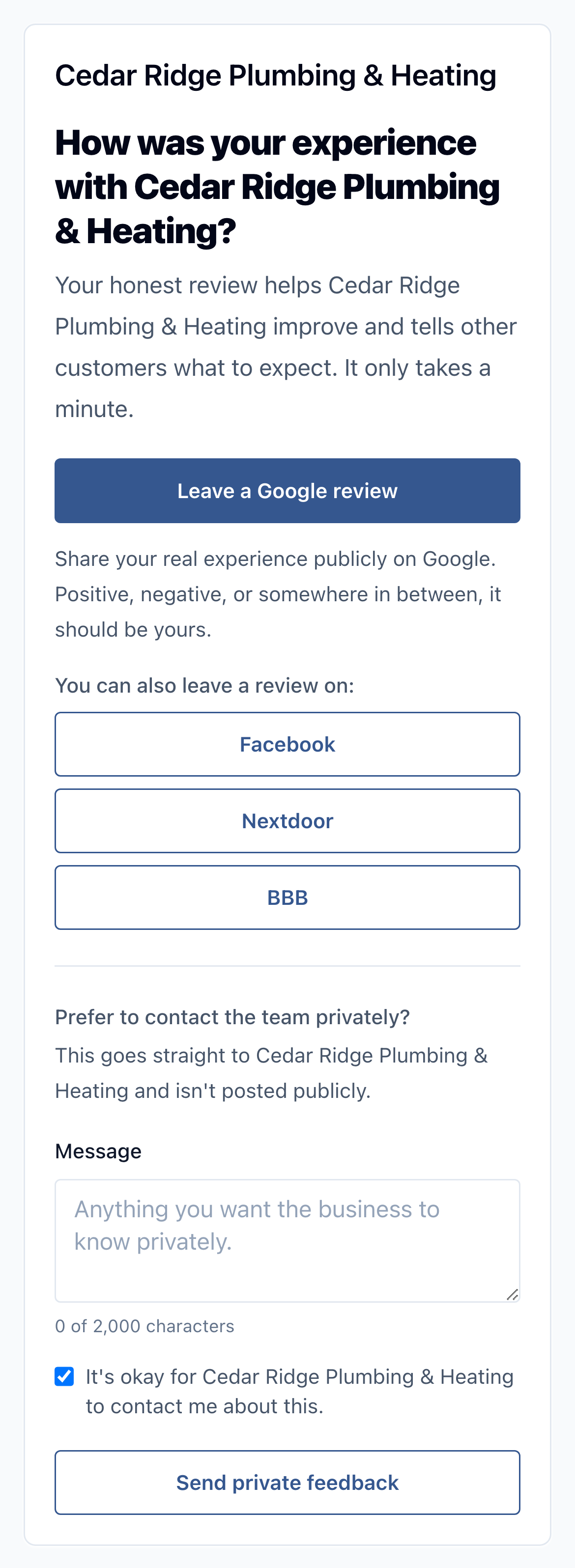
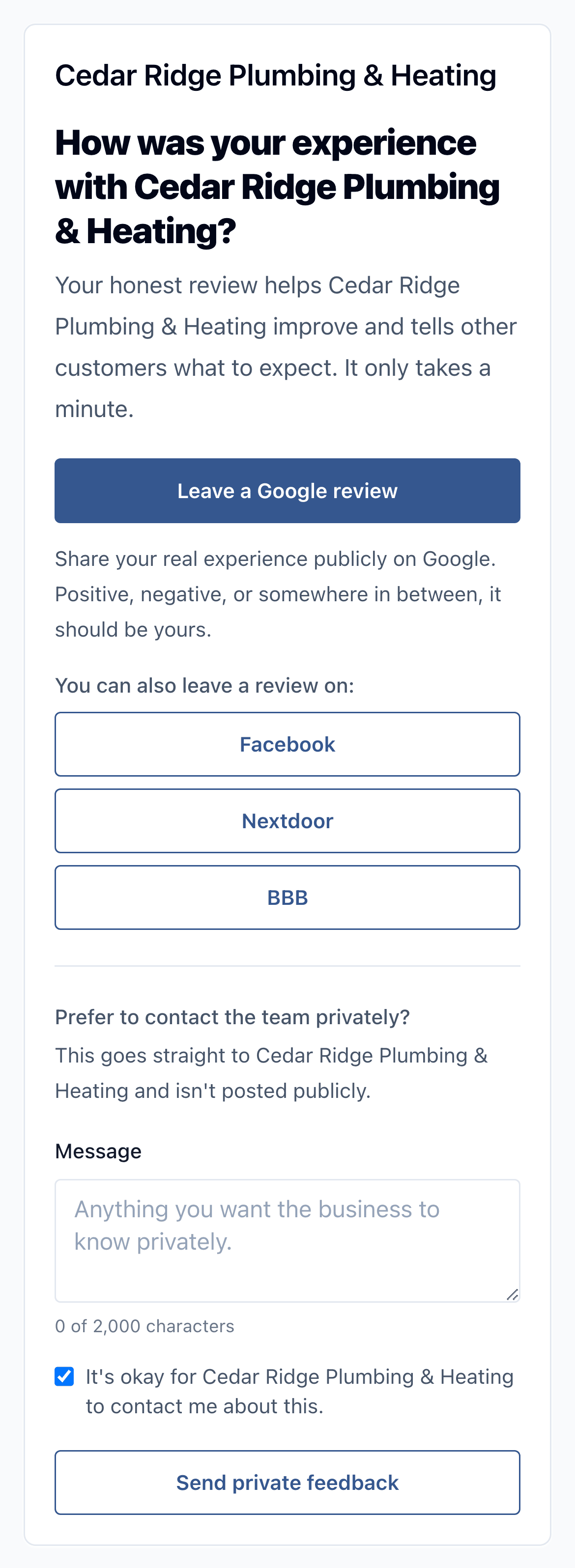
Google comes first. Your other sites are listed below it, with private feedback as another option.
Where the review link goes
- Show your review page with every review site
- Send customers straight to GoogleDefault
Your review sites
- GoogleListed first
- Nextdoor
- BBB
Up to 6 sites below Google.
Your usual request
- Text review request
Wait 2 days
Text follow-upWait 5 days
Email follow-up
Same timing and sending rules as every request.
“Wes was very helpful getting me set up with ReviewNudger. He was professional and answered my questions quickly. With a smaller company like his, you talk directly with the people behind it. I'm happy to be using it.”
A customer’s setup experience in acupuncture.
On your review page
Up to 6 more places to leave a review
Add each site’s name and its review link in Settings.
Any site with a review link
Facebook, Nextdoor, BBB or a site for your trade. Any secure link that starts with https works.
Listed below Google
When you have a Google review link saved, it comes first. Your other sites are listed under it.
Turn on your review page
Choose to show your review page with every review site. The default sends customers straight to Google and skips the page.
One list for all
Every customer who opens your review page sees the same sites, in the same order.
Works with surveys
If a request asks a question first, both the review screen and the lower-rating screen list Google and your other sites.
No Google link yet
If you haven’t saved a Google review link, your other sites are the public review options on the page.
Google reviews sync in
Connect Google to see your Google reviews in ReviewNudger and reply from there.
Review site details
Some businesses want reviews on Facebook, Nextdoor, BBB or a site for their trade, as well as Google. If you show your review page instead of sending customers straight to Google, it can list up to 6 other review sites, such as Facebook, Nextdoor or BBB, below the Google review link. New locations send customers straight to Google, which skips the review page, so you turn the review page on first. Every customer who opens it sees the same sites. Syncing and replies cover Google reviews only. Reviews left on the other sites stay on those sites.
Set it up once. Every request after that shows the same sites.
- 1In Settings, choose to show your review page with every review site instead of sending customers straight to Google.
- 2Add up to 6 sites. Give each one a name and paste the link where customers leave a review on that site.
- 3Requests go out by text or email as usual, following your campaign and sending rules.
- 4The customer opens your review page and picks Google or one of your other sites. They can also send private feedback instead.
Safeguards
Same for everyone
Every customer sees every site
The sites on the page never depend on how a customer might rate you.
Know the limits
Google is where reviews sync
Other sites are links on your review page. ReviewNudger doesn’t connect to them.
Other sites stay on those sites
Reviews left on Facebook, Nextdoor or anywhere else don’t show in ReviewNudger. Read and answer them on that site.
When follow-ups stop
Follow-ups stop once the customer's Google review shows up in ReviewNudger, or when they send private feedback, reply, or opt out. If ReviewNudger can't check the business's Google reviews, tapping through to Google stops them instead. If a customer’s first tap is on one of your other sites, their follow-ups stop right away.
What this feature does not promise
Plain limits
- Up to 6 other review sites per location.
- Other sites show only on your review page. Requests that send customers straight to Google, the default, skip it.
- Syncing and replies cover Google reviews only. Reviews on other sites don’t show in ReviewNudger.
- Each site needs a review link that starts with https. Find it on that site’s page for your business.
Frequently asked questions
Which review sites can I add?
Any site with a review link that starts with https, such as Facebook, Nextdoor or BBB. Give it a name, paste the link, and it shows on your review page.
Will customers still see Google first?
Yes. When you have a Google review link saved, it stays first on the page. Your other sites are listed below it.
Can I read and answer Facebook or Nextdoor reviews in ReviewNudger?
No. Syncing and replies cover Google reviews only. Read and answer reviews on other sites on those sites.
Why don’t my customers see my other sites?
Your location probably sends customers straight to Google. That’s the default, and it skips the review page. Choose to show your review page in Settings.
Do happy and unhappy customers see the same sites?
Yes. If a request asks a question first, both the review screen and the lower-rating screen list Google and every site you added.
Start getting reviews from the customers you already have.
Try ReviewNudger free for 14 days. Connect your software and every customer gets a text or email asking for a Google review.
14 days free, then $29/month per location. Card required.